Tuesday, April 14, 2020

Backyard Puddle Test

We had a fair amount of rain yesterday and last night, which combined with the leftover snow from winter to make a giant puddle in the corner of our backyard. Although it didn't really provide quite enough room for AMOS to get going, I felt the need to try out the boat in  some actual water for the first time this year:


The boat quickly became fetched up on an alder and needed to be rescued by wading part-way into the puddle and reaching for it with a hockey stick. This version of AMOS (AMOS-Catamaran or AMOS-Cat for short) seemed to have about the same draught as the surfboard version, i.e. about one cm, maybe a bit more at the back end due to the weight of the battery.

A lot of work was done this past week on the new version of the PC BoatCaptain software for controlling AMOS and viewing info on ArcGIS maps. I was able to get the boat route, safety locations, and photographic locations all to appear properly in the application and in the saved web maps, and was also able to load those saved web maps into the application. For some reason though, I could only view multi-colored data points from within the application; when I tried to save a map with multi-colored data points in it to the web, all of the points in the web map became the same color. I suspect it's just a limitation of the SDK that I'm using, or the web service that does the saving of the map, but I asked a question on a relevant forum to see if anyone else knew.

For this week I want to focus more on the new BoatCaptain software for controlling and interacting with AMOS. The weather is quickly warming up and it will soon be time to start collecting more test data!

Tuesday, April 7, 2020

Happy Birthday to That Hobo Who Works in Our Backyard Playhouse

There is a bit of a running family joke that there is a hobo squatting in our daughter's playhouse. I have been using the playhouse as a work space lately in the afternoons when the sun is out. It is nice and quiet there, without any of the distractions that are typical within a 5-person home. Today was my birthday, so unbeknownst to me, Kelly went out in the morning to decorate it before my afternoon work session:


Much of this past week has been spent re-writing the graphics code for the new version of the desktop BoatCaptain software. I eventually figured out the methodology required for creating graphics in the application's map that will also show up the same way in a version of the map stored on the web. Saving simple symbols was fairly straightforward, but getting custom image icons (using the "PictureMarkerSymbol" .Net ArcGIS class) to save properly in the version stored on the web took me hours to figure out. It turns out that you need to explicitly define the dimensions of the PictureMarkerSymbol, otherwise it won't display at all on the web.

For example:
    
      PictureMarkerSymbol crossMarker = new PictureMarkerSymbol(new Uri(sImagePath));
      crossMarker.Height = 20;
      crossMarker.Width = 20;
      
Kelly happened to notice a Facebook post about a boy that had 3D-printed a number of "ear guards" that help to ease some of the pressure on the ears of hospital workers wearing masks with elastic straps that hook behind the ears. The model of the part can be found here: https://www.thingiverse.com/thing:4249113. She wondered if I could make any on my printer, and I wasn't sure; I usually have trouble printing things with small details over a large surface area. After a bunch of tweaks and a few failed prints I was able to find some settings I had never tried before that worked really well. I made 3, which she gave to a nurse she knows, so we'll see if they're actually useful or not. The new 3D printing configuration also worked really well for this pH probe holder that I just made today:


Tuesday, March 31, 2020

Box Cat AMOS and Old Dog Learning New Software

The bottom half of the Catamaran AMOS was fiberglassed this week and the whole thing (without electronics) weighed in at 14.6 lbs. This is a bit heavier than the fiberglassed AMOS surfboard, which was only 10.6 lbs, but is to be expected, since the aluminum plates joining the Catamaran pontoons weighed 6.8 lbs. I feel like it would definitely be possible to cut a few pounds by using smaller plates, but this should be OK for now.

Ideally I would like to use smaller electronics enclosures than what I used before, and embed them into the pontoons to cut down on wind resistance, but I'll hold off trying that until after verifying the maneuverability of the boat in the water. So for now, it's just the same old electronics boxes:


The rest of this post will delve a bit into programming nerdiness, so if you have something better to do, go ahead and x this browser tab, I won't mind.

I have neglected the actual code operating on AMOS for a few months now, not really wanting to write something that couldn't be easily tested with all the local waterways frozen. Adding the code for reading in files with picture commands and then taking high resolution pictures at the desired heading(s) could be easily tested indoors, so that occupied a day or two, and seemed to work fine.

The mapping application for AMOS (called "BoatCaptainMap" for now) had some weird disabled navigation arrows in the top-left corner:


They were always there, but for some reason I only just noticed them this past week. After hours of reading, Googling, and frustration I eventually discovered that they were there because I was using a "UserControl" to hold the map grid, when I should have been using a regular Window instead. Fortunately it was relatively straightforward to transition the application to use a Window.

Here is a list of the menu headers and their associated menu items that I have identified for now as being the core user functions required for this app:

File: Load Map, Save Map, Download data file, Download log file, Download image files, Download AMOS code, Send AMOS code, Exit

Preferences: Connection, Alarms, Route, Sensors, Camera, LiDAR (object avoidance), Battery

Data: View data, Map view, Time view, Edit data, Data settings, Export data, Import data

Help: About, User Manual, Website

Some of these functions exist (at least partially) in the older BoatCaptain software, or in test code that I have written recently, but most of them are new functions which will need to be added over the next month or so.

Yesterday I started working on the "Save Map" function, which ideally should take the entire map (of data, or the route, or whatever) as it appears on the screen and save it to the user's ArcGIS account. There are more than a few examples floating around online of how to do this, and I happened to pick one that looked suitable, only to eventually discover after many hours (at 2:30 am) that it was an outdated example that wasn't really correct. I guess security-aware software that uses stuff like OAuth2 or similar technology needs to be updated from time to time, to ensure that it is still as secure as possible. After using more recent documentation and code, I was able to get it working, only to discover that the graphics overlays of sensor points and lines for AMOS to follow that I had in the app were not getting saved to the ArcGIS web map. Argh. Turns out that ArcGIS doesn't allow you to store graphic overlays to their system; rather you need to add things called "features" or "feature sets" to your map, and then those can be properly stored online. I think that the features can actually look the same as graphic overlays, but of course they are programmed differently, so it looks like I'll have to backtrack a bit and re-do most of my graphics code.


Tuesday, March 24, 2020

AMOS Remote Unveiled

Moving into week 2 of the COVID-19 quarantine, my work days are still fortunately much the same as they have been for the last 2 years. Wake-up, eat, shower (sometimes not), work on AMOS-stuff until noon, go for a solitary half-hour ski in the woods, do Measurand stuff until 5, have supper, sometimes go for another ski, do some more AMOS and / or software contracting stuff, then relax for a bit before bed. I guess the only difference is that I'm no longer working in the Measurand building.

This past week I finished populating the components for the AMOS Remote board:


Once my soldering faults were corrected, I tested everything out. The USB to serial wireless connection worked well, but I couldn't properly connect the USB to the Bluetooth (HM-10) board for setting up some default Bluetooth parameters. I looked up the schematic, and pictures of the HM-10 on Amazon (the pins are labeled on the bottom of the HM-10 board), and discovered that the board pin layout was the reverse of what it should have been. After de-soldering and re-soldering the HM-10 upside-down, it worked fine. Reversing the layout of the pins on the mainboard looks like it should be pretty straightforward.

While I was working on soldering, I also soldered up an ADS1115 variable gain board, to get a better picture for the website and instruction manual. The soldering job was better than last time, but still looked a bit messy, and required some hacking around in Photoshop to improve it a little bit:


On the weekend, I spent some time applying fiberglass to the top and sides of AMOS-CAT (the Catamaran version of AMOS). It took me about 2 hours to cut and tape the fiberglass cloth in place on one of the pontoons. Kind of like wrapping a very difficult Christmas present. Thankfully, my daughter Bexie was agreeable to wrapping the other pontoon (for a reasonable price). She was able to do the job in about an hour, and frankly did a better job than I did. The picture below shows the boat after the cloth was applied to the top and sides and epoxied in place. I still need to sand it down and smooth out the bubbles and sharp edges before fiberglassing the bottom.


Tuesday, March 17, 2020

100% Work at Home

I have now switched to working 100% at home, to do my bit to help reduce the infection rate of the COVID-19 virus. The cold that I had last week seems mostly better now, and never developed into a fever or cough, so that's good at least. It's hard to say how long this thing is going to last; if the experience in China is anything to go by, it looks like we will be in for a rough couple of months at least.

On the AMOS front, last week I was able to get some 1/8" thick aluminum plates cut out and drilled by Marcus at Mason & Sons Metal Fabrication and Welding in Rusagonis, NB. Altogether the plates add a bit of weight (~ 6.8 lbs) but they are definitely quite sturdy and hold the pontoons together quite nicely. I also added some 1/4" diameter threaded rods to 6 locations around the perimeter for securing the solar panel with wingnuts. The threaded rods were held in place at first with a bit of construction adhesive, but they still felt a bit loose, so I added some Gorilla epoxy. They seem secure now, but I'll want to test them out a bit, as I suspect they might work their way loose over time. I'm thinking some long slots that the solar panel slides into might work better than threaded mounting posts.

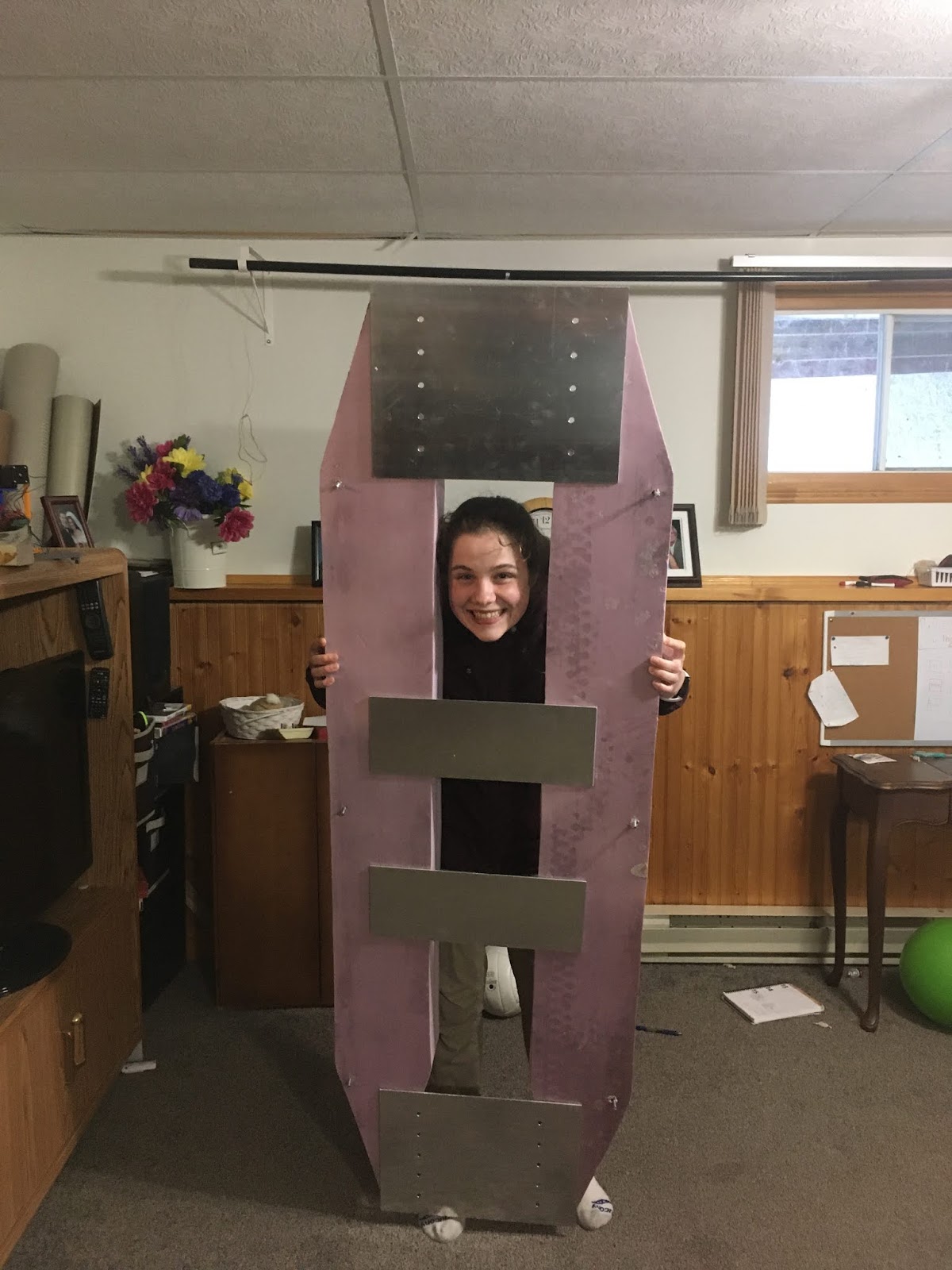
Here is a picture of Kirsten holding the Cat version of AMOS with the aluminum plates:


For now I'll just use the same electronics boxes that the surfboard AMOS had on the front and back metal plates. Later on I might try out smaller boxes recessed into the pontoons themselves. Having the boxes recessed would significantly cut down on wind resistance.

The software user interface for defining where and how to take pictures was completed just today. Here is a demo video that I made of laying out a route that leaves from Liberty State Park and circles around the Statue of Liberty, stopping to take 5 pictures of the statue at each of 4 different locations around Ellis Island. I won't actually attempt a field test of this route; it's just fun to imagine taking AMOS to exciting destinations while I'm stuck inside the house. :-)


Tuesday, March 10, 2020

102 Day Countdown

In order to meet the goal of having AMOS ready for sale by summer of this year, 3 main things will have to happen over the next 102 days:

1. Finish map-based user software for planning routes for AMOS, and viewing previously saved data and live data. PC, iOS, and Android versions of this software will be required.
2. Create documentation for the robot and its associated user software.
3. Update website with software, documentation, product pages, and custom ordering software.

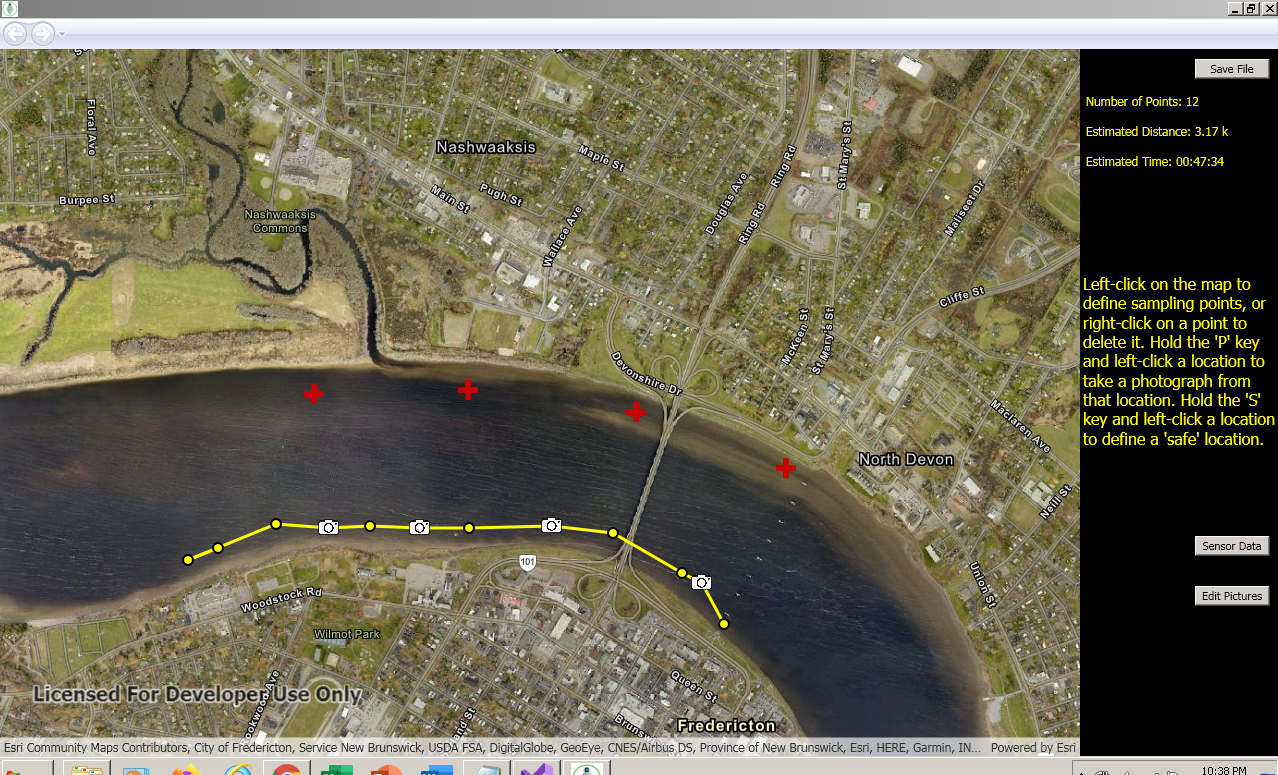
Some progress was made on the first of these this past week. The PC route planning software was updated to allow the user to define "safe" locations on the map (where AMOS can head to if it needs to re-charge) or picture locations where AMOS takes one or more pictures while pointed in a particular direction. The safe locations feature has been implemented on AMOS already, but the picture locations feature is something new. Possibly it's not a great idea to be adding new features at this point, but it seems like a feature that users would like, and it's not exactly straightforward to manually collect pictures with AMOS (like I have been doing up to now) by executing Linux shell commands. Right now the mapping software just requires the user to hold the 'S' key while left-clicking on the map to define a safe location, or hold the 'P' key while left-clicking to define a picture location.


The picture locations will also require some other parameters for specifying camera direction and number of shots. These will be set in a separate interface that the user can bring up with the 'Edit Pictures' button.

A co-worker at Measurand had suggested that I apply to the Volta Cohort: https://voltaeffect.com/cohort/. So I spent a day working on answers to their application questions. I am sure they will be receiving a lot of applications, but if my submission makes their initial cut I will have to go down to Halifax on May 13 to pitch In Nature Robotics on stage against 14 other startups.

The circuit boards for the wireless module arrived successfully from China last week. Coincidentally I developed a cold yesterday, but I'm sure it's unrelated. I've got one board mostly populated, but am just waiting on an FTDI-breakout board, which also happens to be arriving from China.

I drew up some simple aluminum plates for holding the two foam pontoons of the Catamaran version of AMOS together. There will be two 30 x 40 cm plates at either end of the boat to support the electronics boxes, and two 15 x 40 cm plates to support the center part of the boat and give it some structural stiffness. Hopefully the same construction adhesive that I used to glue the foam together will also work on the aluminum. It seems to be pretty strong stuff. Once those are finished I'll apply a fiberglass coating to the pontoons.

Tuesday, March 3, 2020

Meet Jata, Employee #1!

Thanks to some funding support from Venture For Canada, In Nature Robotics is pleased to announce that Jata MacCabe will be the company's first ever employee, working as a sales and marketing intern for the May to September summer term of this year. Jata is a multi-scholarship student and is currently completing her 3rd year of Computer Science at the University of New Brunswick, specializing in information systems. She has also completed a number of business and marketing courses and has extensive experience building and promoting digital communication platforms for small businesses, which should serve her well in her upcoming work term.


In less exciting news, I got the pontoons for the Cat-AMOS nicely sanded to a smooth finish, and visited a metal fabricator to inquire about possibly getting them encased in aluminum. The pontoons as built could not be encased in aluminum, since any welding process would certainly melt them, but it would be possible to make a twin-hull aluminum Catamaran that could be filled with some sort of spray foam, for buoyancy in the event of a leak or damage. The only problem is that any sort of aluminum structure of the size required to hold the solar panel and electronics boxes would weigh at least 35 lbs, probably more. The current surfboard design is only about 29 lbs, with the battery, electronics boxes, and everything included. So I guess I'll be sticking with a fiberglass shell for the foam pontoons. Hopefully I'll take better care around the edges this time to make sure that everything is nice and smooth without any fiberglass splinters. 

I also got more done on the ArcGIS-based mapping software for viewing diagnostic files recorded from AMOS. The following video is an example of the interface for viewing where the boat traveled, and what its internal temperature, voltage, and heading was at any given point of time.